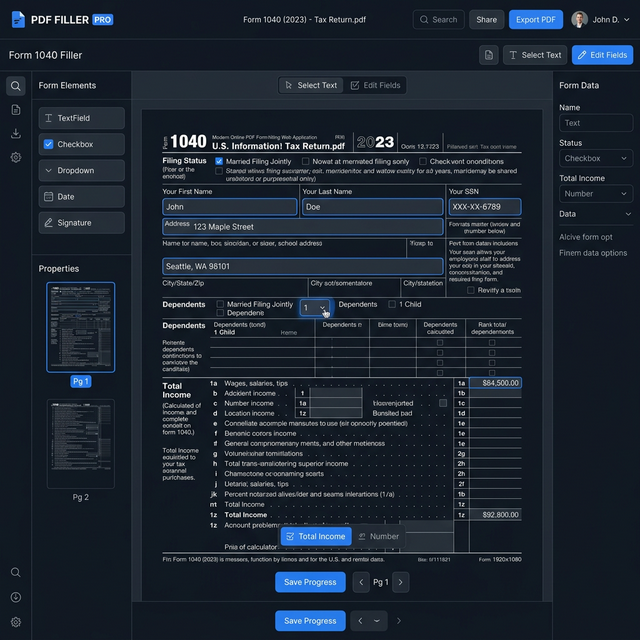
The Fastest Way to Fill PDF Forms Online
Whether you're completing tax documents, job applications, government forms, or tabletop RPG character sheets, the Tavernus PDF Form Filler automatically detects every interactive field in your document and lets you fill it out with ease.
Our intelligent field detection engine identifies text inputs, checkboxes, radio buttons, date pickers, and dropdown menus within seconds. Simply upload your PDF, click on any field, and start typing. The tool supports auto-completion for common field types like names, addresses, and dates — saving you significant time when filling repetitive forms.
Key Capabilities
Auto Field Detection
Our engine scans and highlights all interactive fields instantly, including hidden fields that standard readers often miss.
Smart Autocomplete
Save time with intelligent suggestions for common fields — names, addresses, phone numbers, and dates autofill as you type.
Multi-Page Handling
Navigate and fill forms across hundreds of pages seamlessly. Jump between fields with Tab and Shift+Tab keyboard shortcuts.
Signature Integration
Once your form is filled, add your e-signature directly. Draw, type, or upload — and finalize the document in one session.
Perfect for RPG Character Sheets
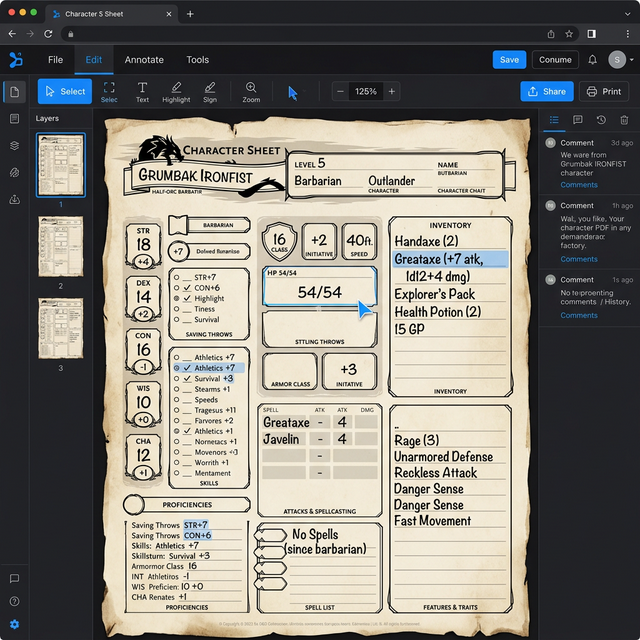
Tavernus PDF Form Filler was born from the tabletop RPG community. We know how complex a D&D 5e character sheet or a Pathfinder 2e chronicle record can be. Our engine handles multi-column layouts, nested checkbox groups, and calculated fields that other PDF tools simply ignore.
Upload your character sheet template, fill in your stats, backstory, inventory, and spells — then save it as a flat PDF or keep it editable for your next session. No printing required.
Questions About the Form Filler
Tavernus supports all standard AcroForm and XFA-based PDF forms. This includes forms created in Adobe Acrobat, Microsoft Word, LibreOffice, and most government form generators. We also handle interactive forms built with specialized TTRPG form generators.
Yes. Pro and Enterprise users can save form progress in their cloud workspace and return to complete it later. Free users can download the partially filled PDF and re-upload it to continue editing in a new session.
Absolutely. All form data is processed in an encrypted, isolated environment. We use 256-bit AES encryption for data in transit and at rest. Your filed data is never stored on our servers — once you download or export the document, your data is purged within 60 minutes. Our infrastructure is SOC 2 Type II certified.
Yes. Tavernus PDF Form Filler is fully responsive and works on smartphones and tablets. While we recommend a desktop browser for complex multi-page forms, our mobile interface supports touch-based field selection, pinch-to-zoom, and on-screen keyboard input for all field types.